
HIGHER EDUCATION
VisionSync gives colleges, universities and systems one place to run the strategic plan. Every campus, college and department keeps its own plan, links it to the institutional goals it supports, and updates progress where the work happens.
30 minutes. We will show your own plan structure, not a generic demo.

initiatives tracked across the four campuses of the University of Nebraska
Pittsburg State refined Year 1 into 130 focused priorities
most institutions go live within 90 days, training included
THE SITUATION
Update season
Somebody sends a request, updates come back in a dozen formats, and somebody else stitches them together.
The report is already old
By the time the board packet is built, it describes a quarter that has ended.
Three versions of one initiative
The same work gets reported differently by three offices, and nobody knows which is current.
Work without a home
People in departments and centers cannot name the institutional goal their work supports.
THE LAYERS
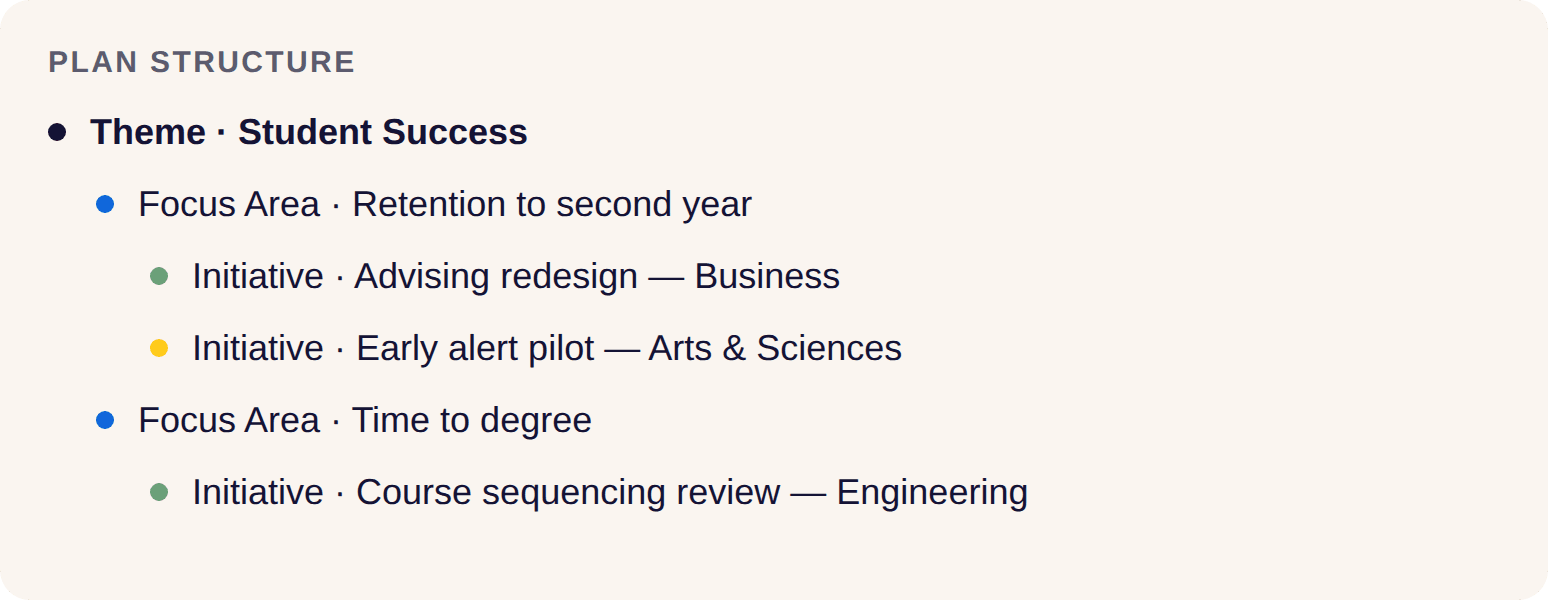
Every layer of your institution can hold its own plan. VisionSync links them. A department initiative rolls up to a college goal, the college goal rolls up to the campus, and the campus rolls up to the institutional plan.
Each layer keeps its own ownership and its own language. Leadership sees the whole thing in one view, without asking anyone to rewrite their plan.

THE PLATFORM
Can each college keep its own plan?
Yes. Every campus, college, department and center builds its own plan and links it to the goals above it. Structure follows your org chart, including centers and institutes that do not sit under one college.
Who enters the progress updates?
The people doing the work. Owners get automated reminders and post updates in place, so status comes from the source instead of a chase.

How do leaders see where things stand?
Live dashboards and heatmaps by campus, college, goal or owner. Leadership can see what is moving, what is stuck and who needs support without opening a spreadsheet.

What do board and cabinet reports look like?
Reports come out of the platform with current data. You choose the slice, whether that is the full plan, one college, or the initiatives tied to a single goal.

Can we just ask where the plan stands? BETA
PulseIQ, our private planning AI, is in beta with clients now. Ask a question about your plan and get an answer from your own data, with tenant-level isolation. Your plans and conversations are never used to train underlying AI models.
ACCREDITATION
Tag any initiative to the criteria it supports. When the self study or interim report comes around, pull a report of the initiatives that provide evidence, with owners, progress and dates already attached.
HLC SACSCOC MSCHE NWCCU WSCUC Program accreditors
“Our accreditation liaison would do hours of work to get the evidence for HLC reports ready. Now, I just send her a report with the initiatives that provide evidence for how we support the HLC criteria.”
Keristiena Dodge, Chief of Staff, University of Nebraska at Omaha
Evidence report preview
HLC 3.C • HLC 4.B • HLC 5.C
Initiative owners, current progress and dates, ready for export.

INTERACTIVE TOUR
Two minutes, no form. A higher education tour, not the general product one.
USE CASES
Institutional strategic plan
The plan of record, with every goal, strategy and initiative in one structure. Explore our strategic initiative software
Accreditation and compliance
Evidence tied to criteria all year, not assembled the month before.
Program review
Departments track review actions and show what changed.
Enrollment and student success
Initiatives behind recruitment, retention and completion, with owners.
Research growth
Track research priorities and the work that supports them.
College and department plans
Local plans that connect to the institutional goals they support.
WHO USES IT
President and cabinet
One live view of the whole plan and a board report built from current data.
Provost and academic affairs
Academic priorities connected to college and department work.
Chief of staff
One place to check status, so cabinet meetings start from current information.
Institutional research
Evidence for accreditation and review cycles, collected as work happens.
Deans and directors
A college plan that stands on its own and still ladders up.
Chairs and staff
A clear place to post progress, and a clear line to the goal it supports.
PROOF

CASE STUDY
Pittsburg State University
Ten goals, 65 strategies and 343 initiatives in Year 1, refined to 130 focused priorities the whole campus could actually track.
10 goals • 65 strategies • 343 → 130 initiatives
VisionSync is an amazing, user-friendly platform to house our plan, and helps us stay on track and accountable in our planning cycle. The team is responsive and incredibly easy to work with.
Jaime Dalton, Executive Director of Planning and Special Projects, Pittsburg State University
It was one of my favorite software implementations because the team at VisionSync just made it easy.
Vanessa Roof, Director of Enterprise Data Services, University of Nebraska System
For a leadership position, VisionSync is helpful in having broad communication with everyone on campus, so they know what we are doing and have the opportunity to engage.
Dr. Jane Meza, Interim Vice Chancellor, University of Nebraska Medical Center
Dr. Jane Meza on running institutional strategy at UNMC
Three minutes on what changed for leaders once the plan lived in one place.
Interim Vice Chancellor, University of Nebraska Medical Center
TRUSTED BY


IMPLEMENTATION
1
Sandbox
Free for 30 to 60 days. We map your framework and org structure with your planning team and build it in a dedicated sandbox.
2
Contracting
Procurement and contracting run during or after the sandbox, so setup does not wait on paperwork.
3
Role-based training
Your structure and settings carry into production. Sessions by role, recordings you keep, and a refresh session each year for new staff.
4
Go live and first report
Owners add their initiatives, start posting updates, and you produce your first report out of the platform.
SECURITY AND PROCUREMENT
Accessibility
Current VPAT, WCAG 2.2 AA and Section 508 compliant.
Access control
Role-based permissions, so people see what their role should see.
Single sign-on
SAML with Okta, Active Directory and Azure, scoped with your identity group.
Procurement
We work through your security review and provide the documentation your team needs.
COMPARISON
Excel, Sheets, SharePoint
Every layer builds its own version, and rolling it up means copy and paste
Word and PowerPoint plans
Publishing the plan and telling the story
Frozen the moment they are saved, so updates mean rewriting
Project tools
Managing tasks and deadlines inside a team
Built around projects that start and finish, so multi-year goals sit awkwardly
BI dashboards
Numbers you already collect
Cannot show whether an initiative is moving, because that judgment lives with people
VisionSync
One plan across every layer, with updates from the people doing the work
Not a task manager. Teams keep their project tools for day to day work
FAQ
What is strategic planning software for higher education?
It's software that colleges and universities use to run the strategic plan after it's approved, which is often called strategy execution. It connects every college and department to the institutional goals they support, tracks progress and KPIs through the initiatives behind each goal, ties that work to accreditation criteria, and builds cabinet and board reports from the same data.
Is VisionSync built for higher education?
Yes. It's built for colleges, universities and university systems where each campus, college and department runs its own plan under one institutional plan. You name every layer of your framework, each plan keeps its own structure and review cycle, and progress entered on each initiative rolls up into one institutional view. VisionSync grew out of a collaboration between the University of Nebraska Medical Center and the UNeTech Institute.
Can each college keep its own plan?
Yes. Every unit builds its own plan and links it to the goals above it. Local ownership stays local, and the institutional view updates automatically.
Who enters the progress updates?
The owner of each initiative. Automated reminders go out on your cadence, and updates post in place.
How does VisionSync support accreditation and board reporting?
Tag initiatives to the criteria they support, then pull an evidence report with owners, progress and dates.
How is this different from spreadsheets and SharePoint?
VisionSync gives each owner one place to update, rolls those updates up across every layer, and produces reports without rebuilding them.
Can we keep using our project management tools?
Yes, and most institutions do. Project tools track tasks and deadlines inside a team. VisionSync tracks the strategic plan and the initiatives behind it, across every college and department, over the life of the plan.
How long does implementation take?
Most institutions go live within 90 days. We map your framework and org structure with your planning team in a free sandbox, contracting and procurement usually run alongside it, and the structure and settings carry into production. Role-based training and your first report follow.
What does it cost?
Pricing is a one-time implementation fee plus platform access by seat tier. Every feature is included, and single sign-on setup is a separate one-time fee.
Is it accessible and does it meet our security review?
Yes. SSO works through the identity provider you already run, with role-based permissions and plan visibility controls, and data is encrypted in transit. The accessibility work is aligned to WCAG 2.2 Level AA and Section 508, and we can send a VPAT and security documentation for your review.
How many users do we need?
Count everyone who will have a login, including leaders who only read dashboards. Seat tiers run from Team, for under 50 users, to System, for 250 or more, and your tier is set once a year by your active user count.
How does VisionSync connect department goals to the institutional plan?
Each department, college and center keeps its own plan and links its initiatives to the goals above it. Progress entered on each initiative rolls up through the college and campus to the institutional plan, so leaders can see which department work is moving institutional goals.
How does VisionSync keep initiative owners accountable?
Every initiative has one named owner. Reminders go out by email and in-app when an update is due and again when it is overdue, with Microsoft Teams and Slack reminders in beta, and each update needs a short comment explaining the number. Dashboards and heatmaps show what is on track, at risk or off track.
Powerful enough for institutions. Simple enough for small teams.

